


Wired vs. Wireless Security Camera Installation: Which Is Better?
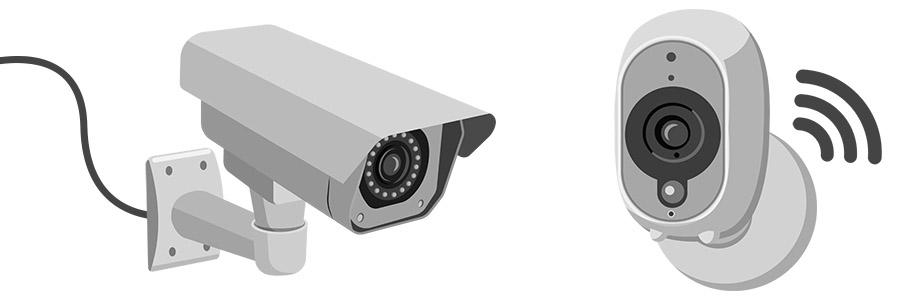
Neither type wins in every situation. Wired cameras tend to be more reliable, secure and sharper, while wireless cameras are easier to install and move.
If you want a simpler setup and flexibility, a Wireless Security Camera in Corpus Christi, TX is worth a look. For bigger properties, wired often makes more sense. Here’s how they compare.
Wired Security Cameras: Pros and Cons
Wired cameras connect to a recorder through coaxial, CAT5 or CAT6 cable. That same cable also delivers their power.
What Works and What Doesn’t
- Pro: Wi-Fi blips and outages don’t affect them
- Pro: They don’t need to sit near a power outlet
- Con: They usually need professional installation, which adds cost
- Con: They’re fixed in place, so moving one means moving its cables
Wireless Security Cameras: Pros and Cons
Wireless cameras send video over Wi-Fi or cellular to a cloud server or recorder. They still need power, though.
Some run on batteries, but most plug into an outlet or a solar charger. Cameras that are fully battery-powered are often called wire-free.
What Works and What Doesn’t
Wireless cameras are easy to install, adjust and move. Cloud storage also lets you check footage from anywhere.
The trade-offs are lower video quality, a monthly storage cost and limits on how many cameras one Wi-Fi network can handle.
Installation Process: Wired vs. Wireless
Wired Installation
Wired systems need physical cable run to a recorder. Outdoors, that cable may need to be buried or run along the exterior of the home.
An electrician may need to open walls and pull cable through, so installation is usually professional work.
Wireless Installation
Small wireless cameras can often go up with a removable adhesive strip or just one or two small screws. You can place them anywhere within reach of your router’s signal.
That makes wireless systems easy to DIY and easy to adjust later.
Cost and Installation Hassle
When you compare cost and hassle, wireless is typically the winner. Wired setups often mean hiring an electrician, which adds to the total.
Wireless has its own costs, though. Cloud storage plans charge monthly fees based on how much data you want to keep.
Wired cameras also become fixtures, so they stay if you move. Wireless cameras can come with you.
Reliability and Connection Stability
Wired cameras don’t depend on Wi-Fi, so their connection and video feed are more stable. They aren’t affected by Wi-Fi blips or outages.
Wireless cameras rely on a strong signal. Wi-Fi speeds can also slow down when many devices stream at once, which can affect your footage.
Video Quality and Storage
Resolution
A wired camera may offer up to 8K video. Wireless cameras more commonly reach only 720p to 2K.
Wireless cameras are often set to lower quality so footage transfers quickly over Wi-Fi.
Storage and Recording
Wired cameras store footage locally on a DVR and can record continuously. Many wireless cameras record only when motion is detected, and they use cloud storage you can view from anywhere.
Security and Hacking Risks
Wireless cameras can be hacked. The likelihood is low if you follow firewall and password best practices, but there are more entry points than with wired systems.
A wired camera streams through a physical cable, which makes breaking in virtually impossible.
If you go wireless, secure the cameras, your router and any phone signed in to the app. A lost phone with no passcode can undo all your other precautions.
Power Source and Outage Backup
An internet outage won’t stop a wired camera from recording. A power outage might, but most wired systems include a battery backup in each camera, in the DVR, or both.
Wireless cameras can run on batteries, plug-in power or solar. Batteries on a roof or other hard-to-reach spot are inconvenient to change, and can be dangerous.
Coverage and Scalability
If you need lots of cameras across a large area, wired PoE systems are the usual route. One source notes you can’t build huge camera setups over a wireless internet connection.
Wired systems are also recommended for larger properties and businesses. For a bigger compound or small business, an electrician can handle the install.
How to Choose Between Wired and Wireless
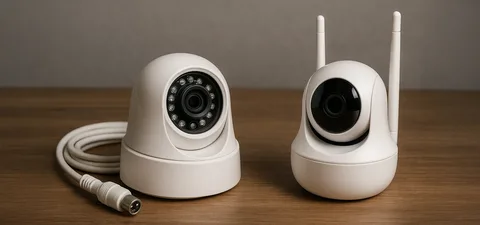
Wired systems often suit homeowners who want stability and don’t mind the extra installation cost. Renters may prefer wireless for its low cost and portability.
- Choose wired for large properties, businesses and top video quality
- Choose wireless for easy DIY setup, renters and flexible placement
- Combine both if you want the benefits of each
Red Alarm Security serves Corpus Christi, Victoria, San Antonio and Austin, TX, and offers free estimates.
Final Thoughts
Wired cameras give you stability, quality and security. Wireless cameras give you easy installation and flexibility. Think about your property, your budget and who will install it. If wireless fits, a Wireless Security Camera from a licensed local installer is a good place to start. Red Alarm Security holds Texas license B10443401 and has 14+ years of experience.
FAQs
Which is better, wired or wireless security cameras?
There’s no definitive winner. It depends on your property, budget and priorities.
Can I install wireless cameras myself?
Usually, yes. Many can be mounted with an adhesive strip or a couple of screws.
Do wired cameras work during a power outage?
Most wired systems include a battery backup, so they can keep working.
Do wireless cameras need power?
Yes. Some use batteries, but most use an outlet or a solar charger.
Are wireless cameras easy to hack?
They’re easier to hack than wired ones. Good firewall and password habits keep the risk low.

 English
 Arabic
 French
 Spanish
 Portuguese
 Deutsch
 Turkish
 Dutch
Dutch
 Italiano
 Russian
 Romaian
 Portuguese (Brazil)
 Bengali