


Guide to Clone Salesforce Dashboards By Using migSO
A Salesforce Dashboard is a visual display of key performance indicators (KPIs) and data from multiple Salesforce reports on a single screen, using charts, graphs, and tables. Admins often need to clone Salesforce dashboards to create customized views and ensure consistent reporting across orgs.
However, manually recreating Salesforce dashboards often leads to a high probability of errors and inconsistencies. So, how do you seamlessly clone Salesforce Dashboards across orgs? This is where admins can rely on migSO!
With its latest Clone Dashboard feature, migSO streamlines dashboard cloning while enabling admins to save time and ensure accuracy. This guide explains the importance of dashboard cloning and how migSO simplifies this complex process.
Why Clone Salesforce Dashboards Between Your Orgs?
Salesforce dashboards enable admins to unlock personalized views for different users (e.g., sales reps vs. managers). Salesforce dashboard cloning empowers admins to save significant time.
Step-by-Step Guide to Clone Salesforce Dashboards Using migSO
Click “App Launcher” and search & select migSO.
Woohoo! You have successfully executed the Clone Dashboard from one org to another.
Going through the Migration Wizard Logs
-
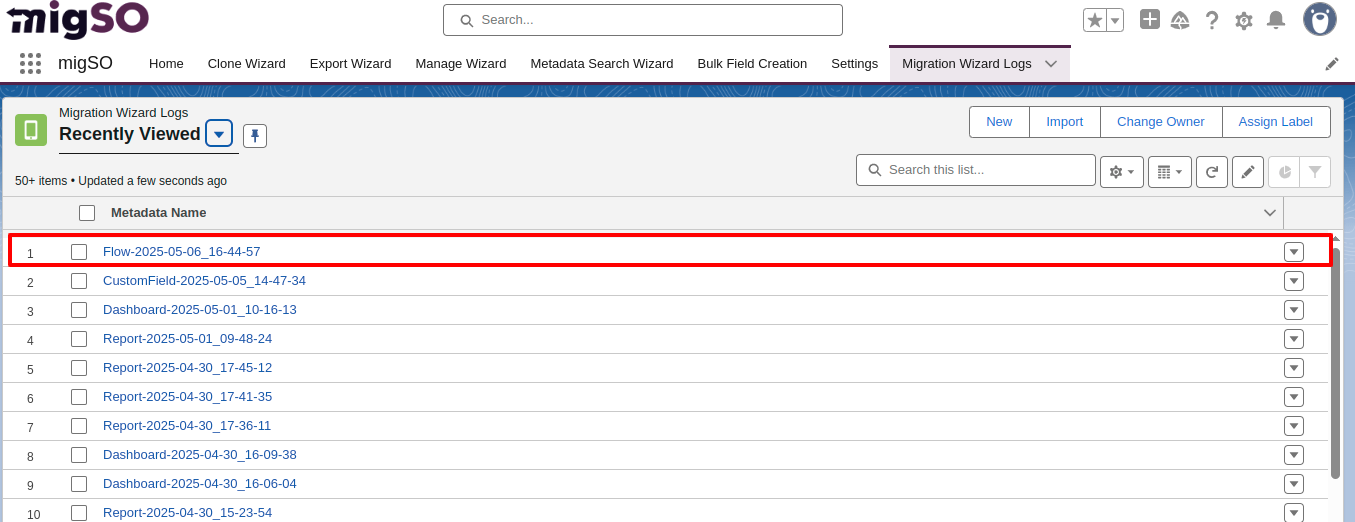
You can access the deployment history by moving to Migration Wizard Logs. You’ll find a list of all metadata operations executed in your org for the specified dates.
-
Click on the recently deployed Salesforce dashboards here.

-
Here, you’ll get the details of the cloned dashboard.

-
To download the deployment report in Excel format, head to the Related tab and click on the file.
Conclusion
Admins can effortlessly manage metadata across their orgs using migSO. This magnificent app empowers admins to Clone Salesforce Dashboards effortlessly thanks to its robust functionality. You can seamlessly migrate Salesforce Dashboards without needing to create them from scratch every time. Rethink metadata management and maximize your productivity with migSO!
Who Are We?
Tech9logy Creators is a Registered ISV Partner Company with over 11 years of experience. We have a certified team of developers with extensive knowledge about Salesforce AppExchange and provide you with the best-in-class personalized apps. Our dedicated Salesforce experts help you bring the best out of your CRM and ensure your business operates at its highest potential.
Contact us for more information.

 English
 Arabic
 French
 Portuguese
 Deutsch
 Turkish
 Dutch
Dutch
 Italiano
 Russian
 Romaian
 Portuguese (Brazil)
 Greek
Greek
 Bengali