


How Odoo Solves Multi-Company, Multi-Currency, and Multi-Location Challenges
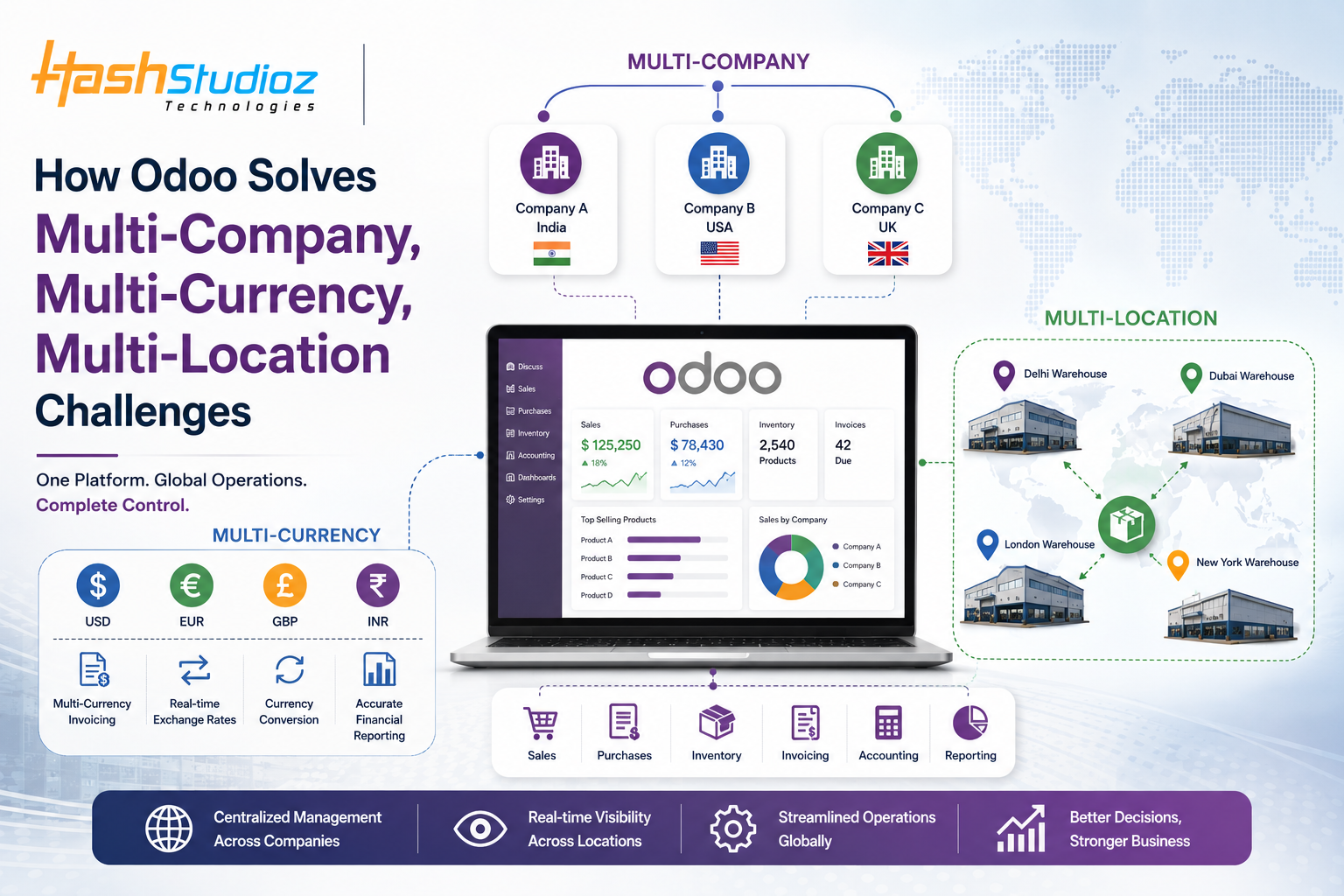
As a business grows, managing operations becomes more complicated. A company may start with one office, one warehouse, and one currency. But after expanding into different countries or regions, new challenges appear.
The business may have:
-
Multiple companies or legal entities
-
Different currencies
-
Several warehouses and locations
-
Different tax rules
-
Separate customers and suppliers
-
Different accounting requirements
-
Multiple teams working across regions
Managing all of this through spreadsheets and separate software can become difficult.
Odoo can help businesses manage these operations through a connected ERP system. It allows companies to organize multiple companies, currencies, warehouses, and business processes while keeping important information connected.
What Are Multi-Company Challenges?
A growing business may operate several companies under the same business group.
For example, a company may have:
-
Company A in India
-
Company B in the United States
-
Company C in the United Kingdom
Each company may have its own customers, suppliers, invoices, expenses, taxes, and financial records.
If these companies are managed separately using spreadsheets or disconnected software, employees may have difficulty getting a complete view of the business.
Common Multi-Company Problems
Businesses may face problems such as:
-
Maintaining separate financial records
-
Managing transactions between companies
-
Tracking customers and suppliers
-
Preparing consolidated reports
-
Managing different tax requirements
-
Avoiding duplicate data
-
Controlling access between companies
Odoo can help organize these activities within a connected ERP environment.
How Odoo Helps With Multi-Company Management
Odoo supports multi-company operations, allowing businesses to manage multiple companies from the same system.
Each company can maintain its own business information while authorized users can work across companies when required.
For example, a business group can manage different company records, customers, vendors, products, sales orders, purchases, and accounting activities based on its configured structure.
This can reduce the need to maintain completely separate systems for every company.
Managing Transactions Between Companies
Companies within the same business group may work with each other.
For example:
Company A → sells products → Company B
If these transactions are handled manually, finance teams may need to create and update records in different systems.
Odoo can support inter-company workflows based on the business configuration.
This can help reduce repetitive work and make transactions easier to track.
What Are Multi-Currency Challenges?
International businesses rarely operate with only one currency.
A company may purchase products in USD, sell them in EUR, and maintain its main accounting records in INR.
This creates several challenges.
Exchange rates can change regularly, and businesses need to manage the impact of these changes on invoices, payments, purchases, and financial reports.
Common Multi-Currency Problems
Businesses may struggle with:
-
Different currencies for customers
-
Different currencies for suppliers
-
Changing exchange rates
-
Foreign currency invoices
-
Currency conversion
-
Payment reconciliation
-
Financial reporting
-
Exchange rate differences
Managing these activities manually can increase the risk of errors.
How Odoo Helps With Multiple Currencies
Odoo supports multi-currency business operations.
Businesses can configure the currencies they need and use different currencies for customers, suppliers, sales, and purchases according to their requirements.
For example, an Indian company selling products to customers in Europe can manage customer transactions in EUR while maintaining its main company currency in INR.
This makes international transactions easier to organize.
Managing Exchange Rate Changes
Currency values can change over time.
Suppose a company creates an invoice when the exchange rate is one value and receives payment later when the exchange rate has changed.
The difference may need to be recorded correctly.
Odoo can help businesses manage currency-related accounting processes according to their configured accounting setup.
This reduces the need for employees to calculate every currency difference manually.
What Are Multi-Location Challenges?
Multi-location management becomes important when a business has more than one warehouse, store, branch, or distribution center.
For example, a company may have:
-
Delhi warehouse
-
Mumbai warehouse
-
Dubai warehouse
-
London warehouse
Each location may hold different products and stock quantities.
Without a connected inventory system, it can be difficult to answer a simple question:
"Where is the product currently available?"
How Odoo Helps Manage Multiple Locations
Odoo's inventory capabilities allow businesses to organize warehouses and locations within a connected system.
Teams can manage stock movements between different locations and monitor inventory based on the company's configuration.
For example:
Warehouse A → Internal Transfer → Warehouse B
The movement can be recorded in the system, helping teams maintain better visibility of inventory.
Managing Stock Across Multiple Warehouses
Imagine a company has 1,000 units of a product:
-
400 units in Warehouse A
-
350 units in Warehouse B
-
250 units in Warehouse C
If inventory is managed manually, employees may need to check different spreadsheets to understand the total stock.
With a connected Odoo inventory setup, businesses can get a more organized view of stock across warehouses and locations.
This can help teams make better decisions about purchasing, transfers, and order fulfillment.
Connecting Sales, Purchasing, and Inventory
Multi-location operations become much easier when sales, purchasing, and inventory processes are connected.
For example, a customer places an order for a product.
The business can check available inventory and determine which warehouse can fulfill the order.
If stock is not available at the preferred location, the company can review other locations or plan replenishment.
This creates a more connected workflow:
Customer Order → Stock Check → Warehouse Selection → Delivery → Inventory Update
Managing Different Tax and Accounting Requirements
International businesses may also have different tax and accounting requirements depending on the company or country.
Managing these differences manually can become complicated.
Odoo allows businesses to configure accounting and tax settings based on their business structure and requirements.
This helps companies keep financial transactions organized while operating across different regions.
Businesses should work with qualified accounting professionals when configuring tax and accounting rules for specific jurisdictions.
Better Reporting Across Companies and Locations
When data is stored across different spreadsheets and systems, creating reports can take significant time.
Management may need to collect information from different companies, currencies, and warehouses before preparing a report.
A connected ERP system can make this information easier to access.
Businesses can analyze areas such as:
-
Sales by company
-
Sales by location
-
Inventory by warehouse
-
Purchases by supplier
-
Revenue by currency
-
Expenses by company
-
Customer performance
-
Product movement
This gives management better visibility into business operations.
A Simple Example
Consider a growing manufacturing business operating in three countries.
The company has:
-
3 legal entities
-
4 warehouses
-
Customers in different countries
-
Suppliers using different currencies
-
Multiple sales channels
Previously, each region used separate spreadsheets and accounting tools.
This created problems such as:
-
Duplicate customer records
-
Difficult inventory tracking
-
Manual currency calculations
-
Slow reporting
-
Limited visibility across companies
After implementing a properly configured Odoo environment, the company can connect its sales, inventory, purchasing, and accounting processes.
Each company can maintain its required information while management can get better visibility into the overall operation.
Key Benefits of Using Odoo for Global Operations
A well-planned Odoo setup can help businesses achieve:
1. Centralized Management
Manage multiple business operations from a connected ERP platform.
2. Better Data Visibility
Get a clearer view of companies, warehouses, sales, purchases, and inventory.
3. Easier Multi-Currency Operations
Manage transactions involving different currencies in a structured way.
4. Better Inventory Control
Track products across warehouses and locations.
5. Reduced Manual Work
Connect business processes and reduce repetitive data entry.
6. Improved Reporting
Get better insights across companies, locations, and business activities.
7. Scalable Operations
Build an ERP environment that can grow as the business expands.
How to Successfully Manage Multi-Company Operations With Odoo
Simply installing Odoo is not enough. The system needs to be configured according to the actual business structure.
A practical approach is:
Step 1: Understand the Business Structure
Identify all companies, branches, warehouses, and operating regions.
Step 2: Define Currency Requirements
Determine which currencies are used for sales, purchases, and accounting.
Step 3: Map Inventory Locations
Create a clear structure for warehouses and internal locations.
Step 4: Connect Business Processes
Connect sales, purchasing, inventory, accounting, and other relevant operations.
Step 5: Define User Access
Give employees access to the companies and information they need.
Step 6: Clean Existing Data
Remove duplicate and outdated records before migration.
Step 7: Test the Workflows
Test sales, purchasing, inventory transfers, invoicing, payments, and reporting before going live.
Conclusion
Managing multiple companies, currencies, and locations can become challenging as a business grows. Separate spreadsheets and disconnected software may work for a small operation, but they can create more problems as business complexity increases.
For businesses planning Odoo implementation, migration, customization, or integration, an experienced Odoo Consulting Service can provide the right strategy and technical guidance to build a scalable ERP environment.
Odoo provides a connected ERP environment that can help businesses manage multi-company, multi-currency, and multi-location operations in a more organized way.
The real benefit is not simply having more software. It is having connected business processes and better visibility across the organization..

 Arabic
 French
 Spanish
 Portuguese
 Deutsch
 Turkish
 Dutch
Dutch
 Italiano
 Russian
 Romaian
 Portuguese (Brazil)
 Greek
Greek
 Bengali