


Image Size vs Quality: How to Reduce File Size Without Making Photos Blurry
Images are an essential part of modern digital experiences. Websites, social media platforms, online stores, blogs, and marketing campaigns all depend on high-quality visuals to communicate effectively. However, one common challenge remains: finding the right balance between image size and image quality.
A large image file may look excellent, but it can slow down websites, increase upload times, consume storage space, and create problems when submitting files online. On the other hand, reducing an image too aggressively can make it blurry, pixelated, and unprofessional.
The goal is not simply to create the smallest possible file. The goal is to create an optimized image that loads quickly while keeping the important visual details intact. Using an effective image optimization workflow with tools like an image resizer online free solution can help users achieve the right balance between file size and quality.
Understanding the relationship between image size and quality helps photographers, website owners, marketers, and everyday users make better decisions when preparing images for digital platforms.
This guide explains how image compression works, why quality loss happens, and how to reduce image size without making photos blurry.
Understanding Image Size and Image Quality
Many people assume that larger images always mean better quality. While file size and quality are connected, they are not exactly the same thing.
Image Size
Image size usually refers to two different things:
File size
This is the amount of storage an image requires.
Examples:
- 500KB
- 2MB
- 10MB
Image dimensions
This refers to the number of pixels.
Examples:
- 1920 × 1080 pixels
- 4000 × 3000 pixels
- 1200 × 1200 pixels
Image Quality
Image quality refers to how clear and detailed an image appears.
It depends on:
- Resolution
- Compression level
- Sharpness
- Color accuracy
- Image format
- Original camera quality
A large file does not always guarantee better visible quality. Similarly, a smaller file can still look excellent if it has been optimized properly.
Why Large Image Files Create Problems
High-resolution images are useful for professional photography and printing, but they are often unnecessary for everyday online use.
Large images can cause:
- Slow website loading
- Poor mobile performance
- Longer upload times
- Higher storage requirements
- Increased bandwidth usage
- Failed online form submissions
For example, a smartphone photograph may be 5MB, but a website banner may only need a properly optimized 300KB version.
The extra data in the original file may not provide any visible benefit for online visitors.
Why Reducing Image Size Often Affects Quality
Image compression works by removing unnecessary data from an image file.
During compression, some information may be reduced to make the file smaller.
If compression is too aggressive, users may notice:
- Blurry details
- Blocky textures
- Loss of sharpness
- Color changes
- Pixelation
This happens because important visual information is removed along with unnecessary data.
The key is finding the right compression level where the file becomes smaller but the image still looks natural.
How to Reduce Image Size Without Making Photos Blurry
The best approach to optimization is a combination of resizing and compression.
A simple workflow looks like this:
Step 1: Check the Original Image
Before optimizing, check:
- Current file size
- Image dimensions
- File format
- Intended purpose
A product image for an online store may require different settings compared to a small profile picture.
Step 2: Resize If Necessary
Large dimensions often contain unnecessary pixels.
For example:
Original:
4000 × 3000 pixels
Optimized:
1200 × 900 pixels
Reducing dimensions can significantly lower file size without affecting the visible quality on websites.
Step 3: Compress Carefully
After resizing, apply compression.
Avoid choosing the strongest compression immediately.
Instead:
- Compress gradually
- Preview the result
- Check important details
- Adjust if needed
This helps maintain better quality.
Resize Image Without Losing Quality
The concept of resize image without losing quality does not mean keeping every original pixel. Instead, it means maintaining the important details that viewers notice.
For example, when optimizing a portrait photo, important details include:
- Facial features
- Eyes
- Hair
- Skin tones
- Natural colors
For a product image, important details include:
- Product shape
- Texture
- Labels
- Design elements
A good optimization process removes unnecessary information while preserving the elements that matter.
The Role of Image Dimensions in Quality
Image dimensions have a major impact on both quality and file size.
A photograph captured with a modern smartphone may have thousands of pixels, but most websites do not need the maximum resolution.
For example:
A blog image may only require:
1200 pixels wide
A profile photo may require:
400 × 400 pixels
An online form photo may require:
600 × 600 pixels
Using unnecessarily large dimensions increases file size without improving the user experience.
Reduce Image Size Online for Faster Performance
Many users need to reduce image size online because installing professional editing software is not always practical.
Online optimization tools allow users to:
- Resize images
- Compress files
- Change formats
- Prepare images for different platforms
This is useful for:
- Website owners
- Bloggers
- Students
- Social media managers
- Small businesses
A browser-based workflow makes image optimization faster and more accessible.
Choosing the Right Image Format
The image format you choose can significantly affect file size and quality.
JPEG
JPEG is commonly used for photographs.
Advantages:
- Smaller file size
- Good color quality
- Suitable for web images
Best for:
- Portraits
- Product photos
- Blog images
PNG
PNG is useful for:
- Graphics
- Logos
- Images requiring transparency
However, PNG files can become large when used for photographs.
WebP
WebP is a modern format designed for web performance.
Benefits include:
- Smaller file sizes
- Good image quality
- Faster website loading
However, always check whether the platform supports the format before using it.
Image Compressor Online Free for Quality Optimization
An image compressor online free tool helps reduce file size while maintaining acceptable quality.
Compression is especially useful when:
- Image dimensions are already correct
- File size is still too large
- Website speed needs improvement
- Upload limits must be followed
The best compression tools balance:
- File size reduction
- Visual quality
- Platform requirements
Resize Image Online for Different Platforms
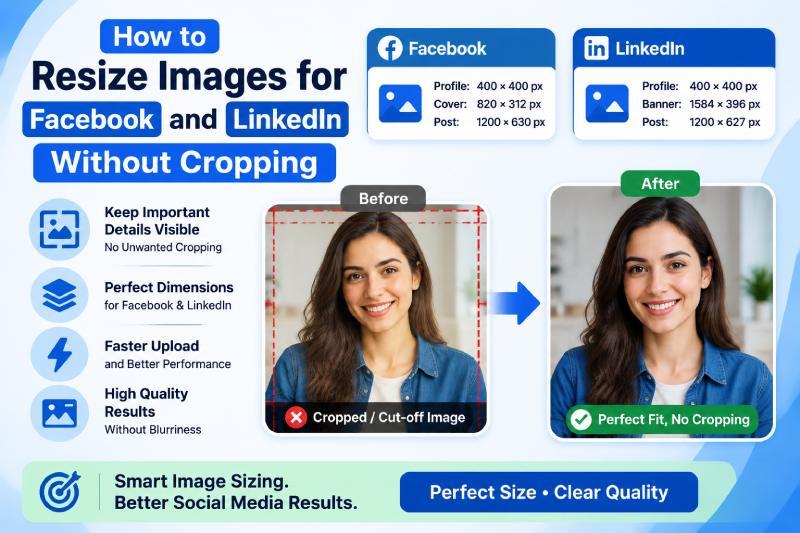
Different platforms require different image sizes.
For example:
Websites
Need lightweight images for faster loading.
Social Media
Need specific dimensions to avoid automatic cropping.
Online Forms
Need exact file size requirements.
E-Commerce Stores
Need clear product images with optimized loading speed.
Using tools to resize image online makes it easier to prepare images for each purpose.
Free Image Resizer Online for Everyday Users
A free image resizer online tool is useful for anyone who regularly works with images.
Common uses include:
- Reducing email attachment size
- Preparing profile photos
- Optimizing website images
- Creating social media content
- Uploading documents
These tools remove the need for complicated editing software.
Image Resizer and Compressor: Complete Optimization Solution
An image resizer and compressor combines two important optimization methods.
Resizing helps reduce unnecessary dimensions.
Compression helps reduce file size.
Together they create images that are:
- Faster to upload
- Easier to store
- Suitable for websites
- Better for mobile users
This combined approach is especially useful for businesses managing large numbers of images.
Common Mistakes That Make Images Blurry
Many users unintentionally reduce quality by making simple mistakes.
Using Excessive Compression
Too much compression removes important details.
Reducing Dimensions Too Much
A very small image cannot display enough detail.
Repeatedly Editing JPEG Files
Multiple saves can gradually reduce quality.
Using Wrong Formats
A format unsuitable for the image type may create unnecessary quality loss.
Ignoring Original Files
Always keep a high-quality original before optimization.
How Businesses Should Optimize Images
Businesses use images for:
- Websites
- Product pages
- Advertisements
- Social media
- Email marketing
A good optimization strategy includes:
- Keep original files safely stored.
- Choose suitable dimensions.
- Resize images based on usage.
- Compress carefully.
- Review quality before publishing.
This creates a professional and consistent digital presence.
Image Optimization for Website Speed
Website speed is one of the biggest reasons businesses optimize images.
Large images can increase page loading time, especially on mobile devices.
Optimized images help:
- Improve user experience
- Reduce bounce rates
- Support SEO performance
- Improve mobile browsing
Search engines prefer websites that provide fast and efficient experiences.
How to Maintain Quality During Compression
To maintain image quality:
- Start with a high-quality original
- Resize before compressing
- Use the correct format
- Avoid extreme compression
- Preview the final result
Small adjustments usually produce better results than aggressive changes.
Can You Resize an Image to a Specific KB Without Losing Quality?
Many users need to resize image to specific KB for:
- Government forms
- Job applications
- Registration portals
- Online submissions
The challenge is achieving the required file size while keeping the image readable.
The best method is:
- Resize dimensions if needed.
- Compress gradually.
- Check the final KB size.
- Review image clarity.
This creates a better balance between requirements and quality.
The Future of Image Optimization
As websites become more visual, image optimization will become increasingly important.
Future tools will focus on:
- Automatic compression
- AI-based quality balancing
- Faster processing
- Better format selection
The goal will remain the same: smaller files with better visual quality.
Final Thoughts
Reducing image size does not mean sacrificing quality. The key is understanding how dimensions, compression, and file formats work together.
By choosing the right approach, users can resize image without losing quality while creating faster and more efficient images for websites, social media, and online platforms.
Whether you need to reduce image size online, use an image compressor online free, or work with an image resizer and compressor, the focus should always be maintaining the right balance between performance and clarity.
The best optimized image is not the smallest one—it is the one that loads quickly while still delivering a clear and professional visual experience.

 Arabic
 French
 Spanish
 Portuguese
 Deutsch
 Turkish
 Dutch
Dutch
 Italiano
 Russian
 Romaian
 Portuguese (Brazil)
 Greek
Greek
 Bengali